
About The Net
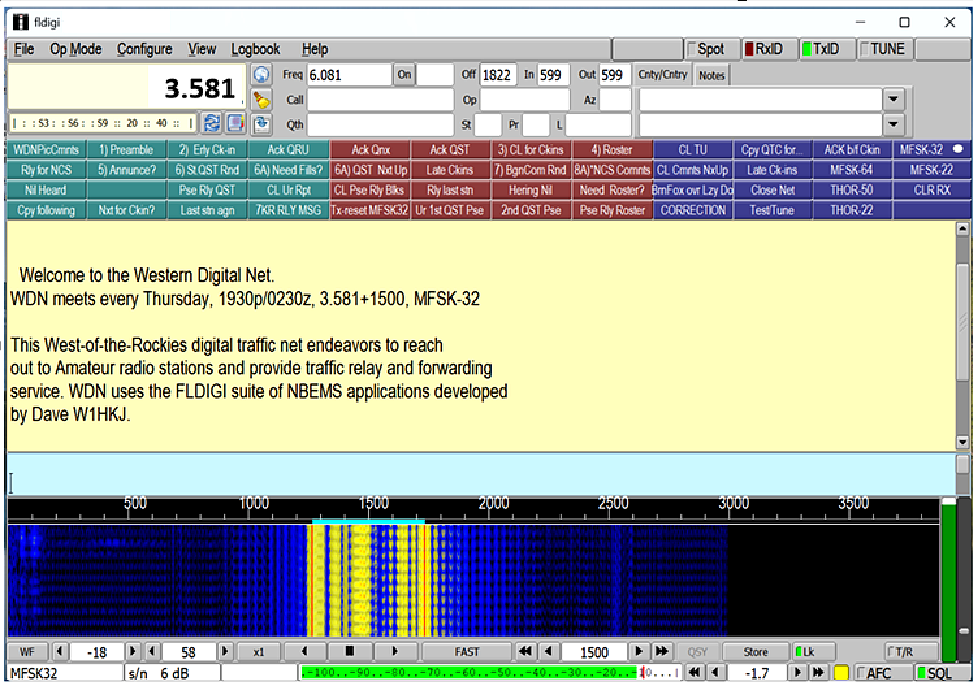
Welcome to the Western Digital Net. WDN meets every Thursday, 1930p/0230z, 3.581+1500, MFSK-32.
This West-of-the-Rockies digital traffic net endeavors to reach out to Amateur radio stations and provide traffic relay and forwarding service. WDN uses the FLDIGI suite of NBEMS applications developed by Dave W1HKJ.
Basic Applications (Free Download):
FLDIGI, FLMSG & FLAMP
On-Air Schedule
Pacific Time
7:00 PM
Every Thursday
Mountain Time
8:00 PM
Every Thursday
Frequency
3581.0 kHz USB
HF / 80m Band
Net Control Stations
KE6SLS
Jaye
Net Control Operator
AE6LJ
Lamar
Net Control Operator
KJ7VGV
Don
Net Control Operator
WA7HHE
Brad
Net Control Operator
---
Add Name
Callsign
---
Add Name
Callsign
Contact
Jaye
KE6SLS — Net Control Operator
Net Founder & Special Credit
Steve
K6ETA — Founder & Creator
This net exists because of Steve's dedication and vision for building a thriving digital amateur radio
community.
73 de K6ETA.
Doug & Mindy
K7KY & W7ZAP — Macro & Operations Instructors
Special thanks to Doug K7KY and Mindy W7ZAP for teaching us how to create Macro's and proper
Digital Net operations via the retired and famous ORCA net.
Required Software — NBEMS Suite
Net Operations
Modes
Select a mode button to see its FLDIGI command and usage notes.
— Select a mode above —
Commonly used WDN Macro's (Follow Net Controls Directions)
Relay and operational macros used during the net.
— Select an operation above —
FLDIGI Preflight Checklist
HF Transceiver Settings
✓
Turn Frequency dial Lock ON on transceiver
✓
Turn XMTR "Compressor" OFF
✓
Turn OFF Receiver Digital Signal Processing (DSP)
✓
Turn OFF Receiver Noise Blanker
✓
RF output power: 5–35 watts is sufficient (do not exceed 45W)
✓
Press T/R in FLDIGI and adjust Sound Card Transmit Audio until ALC barely starts to
indicate
FLDIGI Software Settings
✓
Set Waterfall Frequency to 1500 Hz and click "Lk" to lock transmit
frequency
✓
Turn on RxID — check NCS preference (TxID or RxID only). For smaller local nets: set
TxID on
✓
If using a Repeater only: set Pre-Tone ~1.5 seconds under ID > RsID (leave at 0s
for HF)
✓
Turn SQL button on; adjust SQL slider just above the incoming signal noise floor
✓
Be aware of transmit time. Check FLMSG and FLAMP Time Indicators
✓
Check Rx Level Indicator — Diamond should be Green. Red = too hot, Black = too low
✓
Approximately 1 hour before net: press FLDIGI Tune button and verify your transceiver TX LED lights up. For example: You will have time to correct any Sound Card issues.
Spoken in Many Languages
English
Spanish / Español
French / Français
German / Deutsch
Japanese / 日本語
Mandarin / 中文